
How online payment processing works: from patient tap to money in your bank
Key Takeaways
- Every online payment moves through three key players: the payment gateway locks down card data the moment it is entered, the payment processor routes it to the right bank, and the merchant account holds the funds until they land in your account.
- Seeing a payment confirmed does not mean the money has arrived. Approval happens in seconds, but the funds themselves take one to three business days to reach your account.
- Before your patient's bank says yes or no, it runs the transaction through fraud checks to make sure everything looks legitimate on their end.
- Of everything to look for in a payment system, how well it connects to your practice management software makes the biggest difference to your day-to-day workload.
- When you use a PCI-DSS compliant processor like Stripe, raw card details never pass through your system at all. The gateway handles the sensitive data so you never have to.
Every day, private practitioners across the UK accept payments from patients: by card, by invoice link, or at the point of booking. But most have never had reason to think about what actually happens between a patient tapping their card and money landing in their account. When you understand each stage, you can choose the right tools with confidence, set realistic expectations with patients, and quickly spot if something goes wrong.
If you are looking for the business case for switching to online payments, that is covered separately. What follows is purely about the mechanics.
The key players in any online payment transaction
Before walking through the online payment process steps, it helps to know who is involved. Three components work together behind every card transaction.
The payment gateway is the security layer. When a patient enters their card details (whether on your booking page, in an invoice email, or at a card terminal), the gateway encrypts that information immediately and passes it securely to the next stage. Think of it as the secure tunnel the data travels through.
The payment processor is the intermediary. It takes the encrypted payment request from the gateway and communicates with the relevant banks to check that the payment can go ahead. Stripe and Square are both payment processors, and both integrate directly with WriteUpp.
The merchant account is the holding account. When a payment is approved, funds sit temporarily in a merchant account, managed by your processor, before being transferred to your business bank account. Modern processors like Stripe bundle merchant account functionality into their service, so you do not need to set one up separately.
Step-bystep online payment process
Here is how the online payment process unfolds from the moment a patient initiates a payment request to the moment funds reach your account.
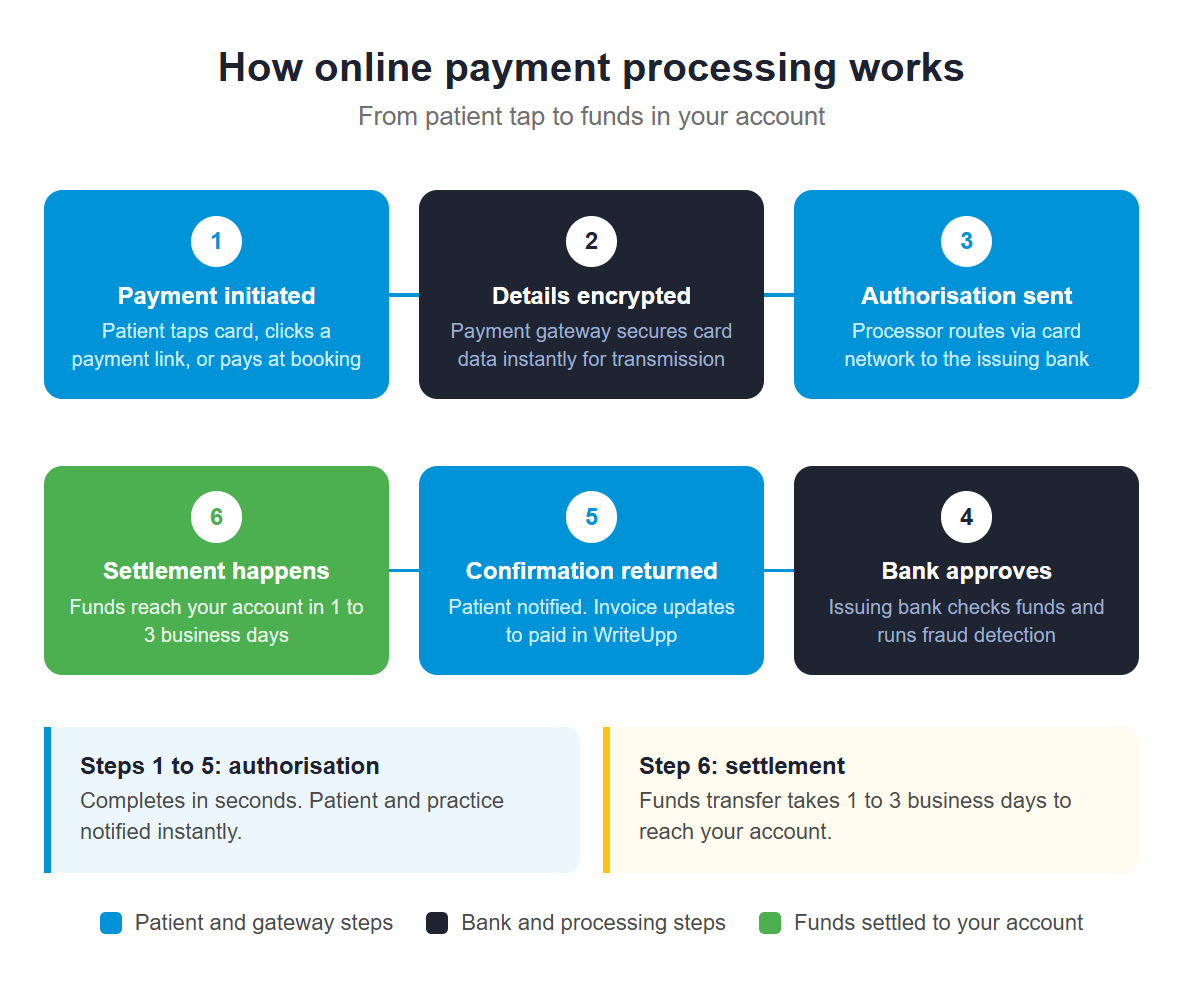
- Payment is initiated. The patient enters credit or debit card details on your online booking page, clicks a payment link in an invoice email, or taps a card at your in-clinic terminal.
- Card details are encrypted. The payment gateway encrypts the information immediately to protect it during transmission. The raw card data never touches your practice management system directly. It goes straight into the encrypted tunnel.
- The authorisation request is sent. The payment processor passes the encrypted request through the card network (Visa, Mastercard, or whichever network the patient's card uses) to the patient's issuing bank. Stripe explains that the acquirer sends this request to the issuing bank via the card network, which then reviews the transaction and sends a response back within seconds.
- The issuing bank approves or declines. The patient's bank checks whether funds are available and runs fraud prevention checks on the transaction. According to Square, the issuing bank runs the transaction through fraud detection models to determine if it is safe before sending an approval or decline back through the same chain. The acquiring bank then relays this response to your payment processor.
- Payment confirmation is returned. The payment gateway passes the response on to the patient and to you. If approved, the patient sees a payment confirmation. If you are using WriteUpp, the invoice status updates automatically from unpaid to paid at this point.
- Settlement happens. Approval is near-instant, but the actual movement of funds takes longer. The approved amount moves from the patient's bank to your merchant account, then transfers to your business bank account. According to Stripe, credit card settlement typically completes within one to three business days after the transaction.
Authorisation confirms the money is there and the transaction is legitimate. Settlement is when it physically arrives. Both are part of the same process, just not simultaneous, and this is the most common point of confusion for practitioners new to online payments.
What to look for when choosing an online payment system
Security and compliance. Any processor you use should meet Payment Card Industry Data Security Standard (PCI-DSS) requirements as a baseline. This is the industry standard for fraud protection and card data security across all healthcare practices. For a full look at what GDPR and PCI-DSS compliance means for your clinic, see our guide to compliant payment processing for healthcare practices.
Integration with your practice management software. When your payment processor connects directly to your practice management system, each payment updates the corresponding patient record, invoice, and booking automatically. Without that integration, you are reconciling payments manually. That is time your team does not need to spend.
Integrated vs non-integrated payment processing
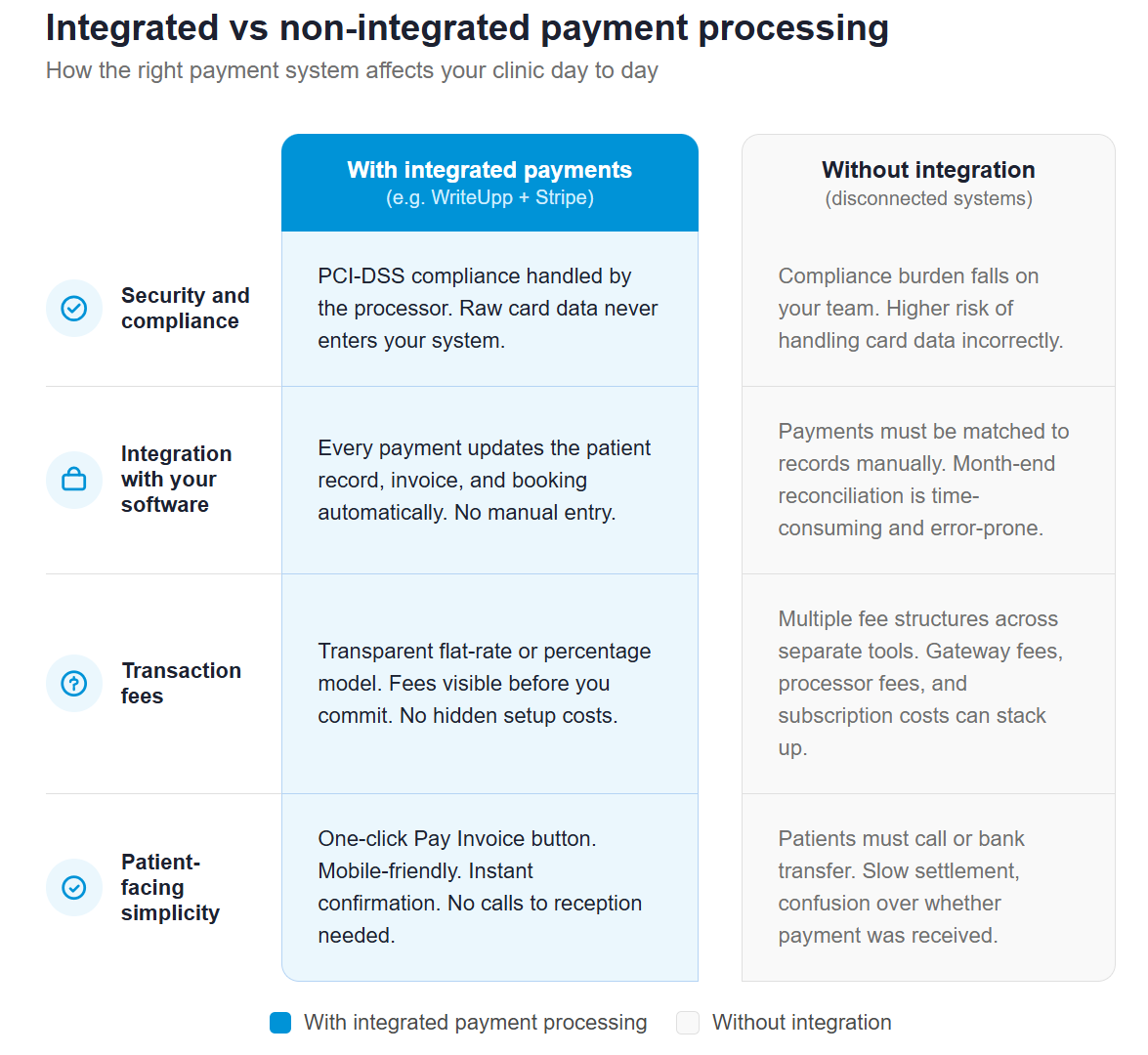
Transaction fees. Payment processors typically charge either a flat rate per transaction or a percentage of the transaction value. Flat-rate models are straightforward to budget for, while percentage-based models can vary depending on card type and whether the transaction is online or in person.
Patient-facing simplicity. The payment experience should be as frictionless as the clinical one. Look for processors that offer a clean, mobile-friendly payment page and clear confirmation at the end of the process.
How WriteUpp handles online payment processing
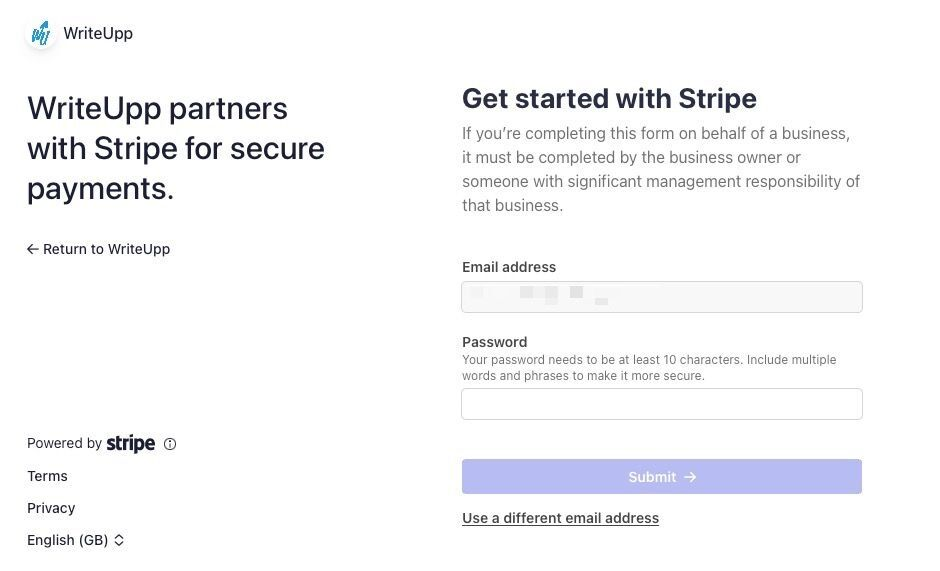
WriteUpp payment processing integrates with Stripe and Square to manage each stage of the online payment process within your practice management system, without requiring separate tools or manual reconciliation.
- Invoice pay links. When you send a patient an invoice through WriteUpp, it includes a Pay Invoice button. The patient clicks the payment link, enters their card details on a Stripe-hosted secure page, and completes the payment. The invoice status updates to paid automatically and you receive an instant notification.
- Pre-payments at booking. You can require payment at the point of online booking. The patient completes payment before their appointment is confirmed, which is one of the most effective ways to reduce no-shows.
- In-clinic card payments. WriteUpp's integration with Square supports chip-and-PIN and contactless payments, including Apple Pay and Google Pay, with transactions linking directly to the correct patient record.
- Automatic reconciliation. Every payment, whether made via digital wallets, card, or payment link, is recorded and reconciled within WriteUpp the moment it is processed. Part-payments are recorded accurately.
WriteUpp is ISO27001 certified and built to meet UK GDPR requirements. To see exactly how payments work inside WriteUpp, take a look at our complete guide to taking payments in WriteUpp.
Start taking online payments with confidence
Understanding how online payment processing works puts you in a much stronger position, whether you are choosing a processor for the first time, explaining the process to a patient, or troubleshooting a payment that has not arrived when expected. When your payment system connects well with the rest of your practice, the entire process runs in the background without demanding your attention.
Ready to put all of this into practice? Try WriteUpp free for 30 days and see how straightforward online payments can be when everything is connected.
Frequently asked questions
What is the difference between a payment gateway and a payment processor?
The payment gateway encrypts the patient's card details and passes them securely into the process. The payment processor takes that encrypted information and communicates with the relevant banks to get the payment authorised. In practice, many providers (including Stripe) bundle both functions together as part of their payment service, so you do not need to manage them separately.
How long does it take for a patient's payment to reach my account?
Authorisation happens within seconds. Settlement (the actual transfer of funds to your bank account) typically takes one to three business days for card payments. You will see the payment confirmed in WriteUpp immediately; the funds follow shortly after.
Is online payment processing secure for healthcare practices?
Yes, when you use a processor that meets PCI-DSS standards. PCI-DSS governs how card data is handled, encrypted, and stored throughout the payment process and includes requirements for fraud detection and fraud management. Neither you nor your practice management software ever holds raw card data directly. The gateway handles that. For a full explanation of what GDPR and PCI-DSS compliance means for your clinic, see our dedicated compliance guide.
What payment methods can my patients use?
Credit and debit cards are the most common options. Digital wallets (Apple Pay, Google Pay) are increasingly popular, particularly for in-clinic payments. Pay-by-link via an invoice email works well for post-appointment settlement. For a full comparison of payment methods for private clinics, including direct debit and payment plans, see our payment methods guide.
Do I need a merchant account to take online payments?
You need a merchant account in principle, but you do not need to set one up independently. Modern payment processors include merchant account functionality as part of their service. When you connect Stripe to WriteUpp, you gain access to everything you need: payment gateway, processor, and merchant account, in a single integration.








Join over 50,000 clinicians that we've helped using WriteUpp
Start my free trial