
Key Takeaways
- Invoicing in private practice connects to appointments, clinical records, and compliance obligations. It is not a standalone task.
- Late payments and manual billing errors cost private practice owners time, revenue, and patient trust.
- HMRC requires VAT records to be kept for at least six years, and GDPR applies to any invoice containing patient data.
- Automating invoice processing reduces admin time and gives you real-time visibility over what is paid and outstanding.
- Purpose-built private practice billing software links invoicing to your clinical workflow so nothing falls through the gaps.
You treat patients. You manage appointments. And somewhere in between, you are also expected to send invoices, chase unpaid bills, correct billing mistakes, and reconcile payments across systems that were never built to talk to each other. For many private practice owners, that last part quietly takes hours they cannot afford to lose.
Good healthcare invoice management is not just about getting paid. It is about protecting your cash flow, staying compliant, and running a practice that does not grind to a halt every time a payment slips through the cracks. The right private practice billing software makes billing and invoicing manageable without adding more complexity to your day.
Why invoicing is harder in private practice than it looks
In private practice, an invoice is not a standalone document. It connects to a patient record, an appointment, a treatment note, and sometimes a third-party payer. When you are creating invoices manually or using a tool that does not connect to your clinical systems, that chain breaks. You end up re-entering data, cross-referencing records, and hoping nothing has been missed.
There is also the compliance layer. HMRC requires VAT records to be kept for at least six years, and that obligation sits alongside GDPR requirements around how patient data within those invoices is stored and accessed. VAT itself adds another consideration: healthcare services are often exempt, but the rules vary depending on what you provide, and generic invoicing tools are rarely built with these distinctions in mind.
Most off-the-shelf invoicing tools are designed for general small businesses. They are not medical billing software, and they do not account for the clinical context behind each charge, the regulatory standards your practice must meet, or the data security requirements that apply when patient information appears on a financial document.
The most common invoicing problems in private practice
1. Chasing payments that should have been settled already
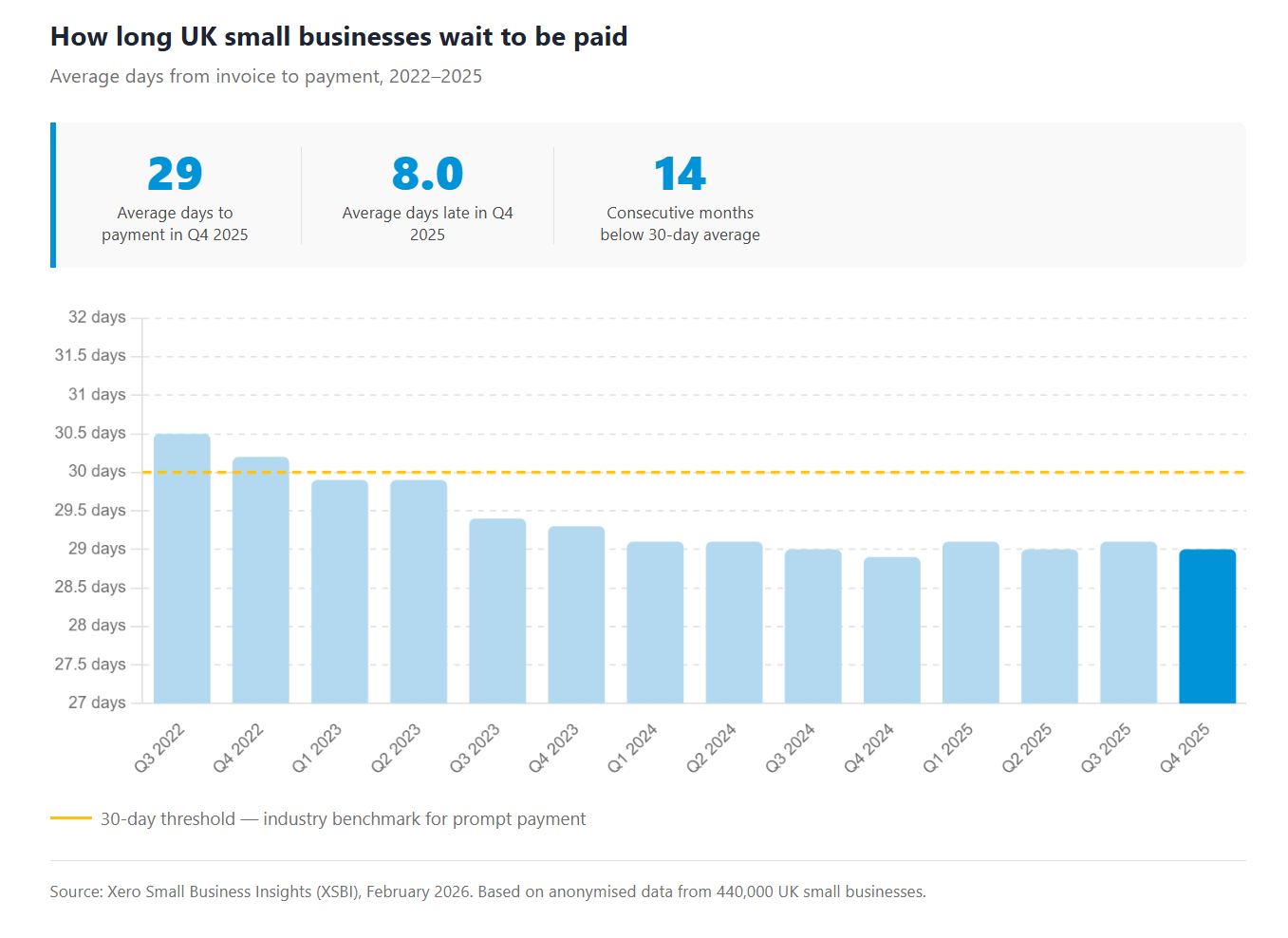
Late payments are a persistent reality for small businesses across the UK. UK small businesses waited an average of 29 days to be paid in the final quarter of 2025, and despite some improvement, late payment remains the norm rather than the exception. For a physiotherapist or counsellor managing their own billing, every overdue invoice means more time spent on follow-up instead of patient care. Manual chasing is inconsistent, easy to forget, and uncomfortable to do repeatedly with the same patients.
2. Billing errors that create more work than they save
When you are creating invoices by hand, errors happen. A session date entered incorrectly, a charge that does not match the appointment type, or a VAT rate applied to an exempt service. Each mistake creates a dispute to resolve, a corrected invoice to issue, and a delay in your payment. Over time, billing errors also erode patient trust. Patients who receive inaccurate invoices start to question the professionalism of the practice behind them.
3. Invoices disconnected from the rest of your clinic
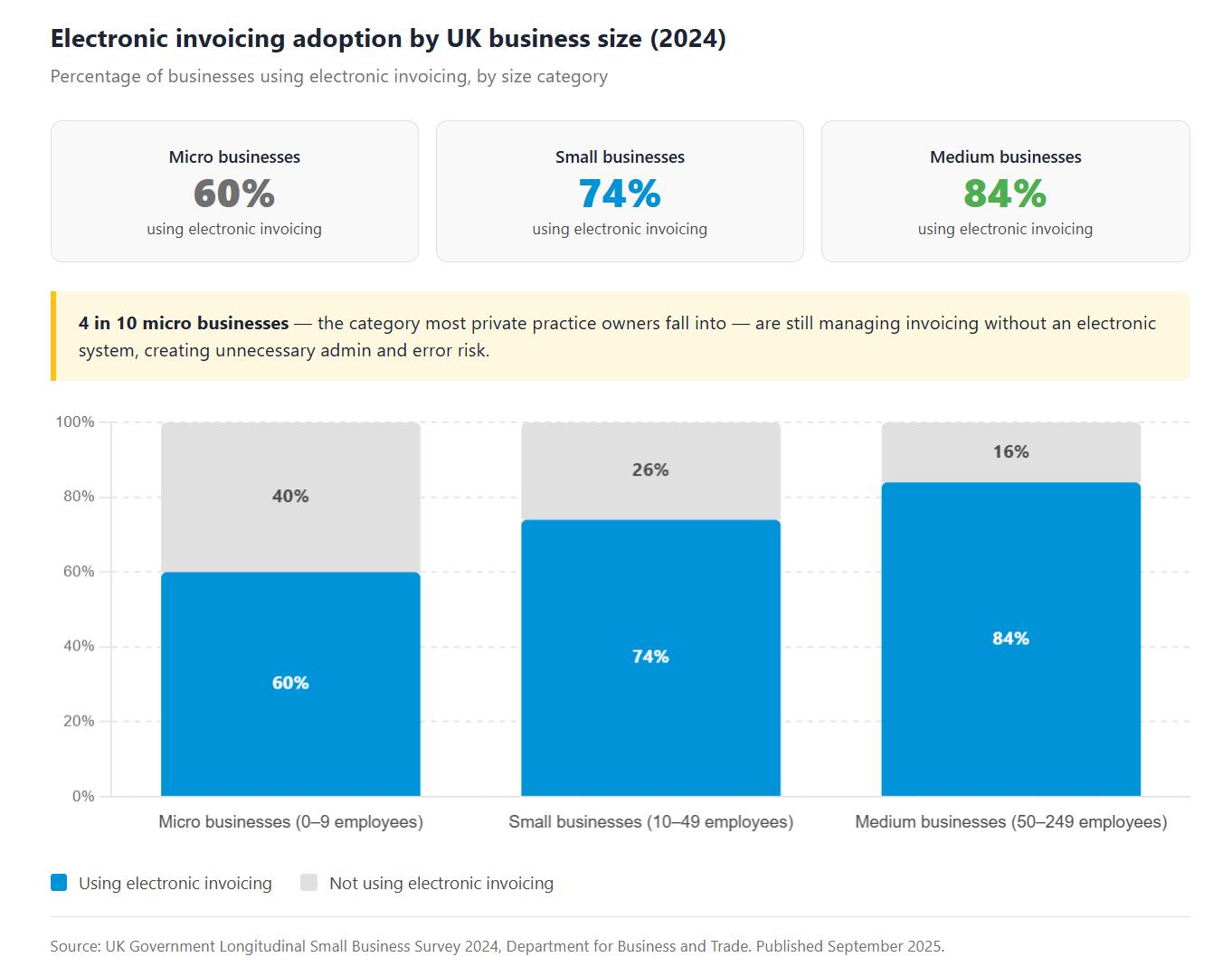
Spreadsheets and standalone invoicing tools do not communicate with your appointment diary or patient records. That means completing a single billing cycle often requires jumping between two or three systems, manually matching appointments to invoices, and hoping the numbers line up. Effective healthcare invoice management depends on those systems being connected, not kept in separate silos. Only 60% of UK micro businesses used electronic invoicing in 2024, which means a significant proportion are still managing this process in a way that creates unnecessary work.
4. Inconsistent payment terms across patients
Without a consistent billing system, payment terms tend to drift. Some patients are given 14 days, others 30. Some receive a payment link, others a PDF. When terms are not standardised, follow-up becomes harder to manage, and patients are left unsure about what is expected of them.
5. No clear view of what's paid and what's outstanding
Relying on a spreadsheet or your memory to track outstanding balances is not a sustainable approach. Without proper payment posting, overdue invoices go unnoticed until they become a cash flow problem. Without clear visibility into what has been paid and what has not, financial forecasting becomes a guessing game.
What good billing software for private practice actually does
Connects invoicing to your clinical workflow
The right software generates invoices directly from completed appointments. Patient details, session dates, and service descriptions are pulled in automatically, so there is no re-entering data and no risk of information falling out of step with the clinical record. Your diary management, patient record, and invoice all live in the same system.
Automates the admin without losing accuracy
When practices automate invoice processing, healthcare admin becomes significantly lighter. Automated billing removes the need to create invoices manually for each appointment. The right tool updates invoice statuses automatically, sends payment reminders at the right time, and gives you a live view of what is paid, unpaid, and overdue, all without requiring you to log the information manually. Practices using online invoice payments can get paid up to twice as fast as those relying on manual methods, because removing friction from the payment process encourages patients to settle promptly.
Keeps you compliant without extra effort
A good billing tool handles compliance as a feature, not an afterthought. That means GDPR-compliant data storage, HMRC-ready record-keeping, VAT handling built into invoice generation, and security standards that protect patient data. You should not need to configure this yourself or run a separate system to stay on the right side of your obligations.
Simpler private practice invoicing with WriteUpp
WriteUpp's payment processing feature is built around how private practice actually works. As a practice management software designed for healthcare professionals, it generates invoices from the information already in the system (patient record, appointment type, session date, fee) when an appointment is completed. There is no manual input required to get to a professional, accurate invoice.
From there, patients receive a pay-link directly, so they can settle their bill online without needing to call the practice or send a bank transfer. Automated reminders go out when payments are due or overdue, and your dashboard shows paid, unpaid, and overdue invoices at a glance. You can see exactly where you stand, without opening a spreadsheet.
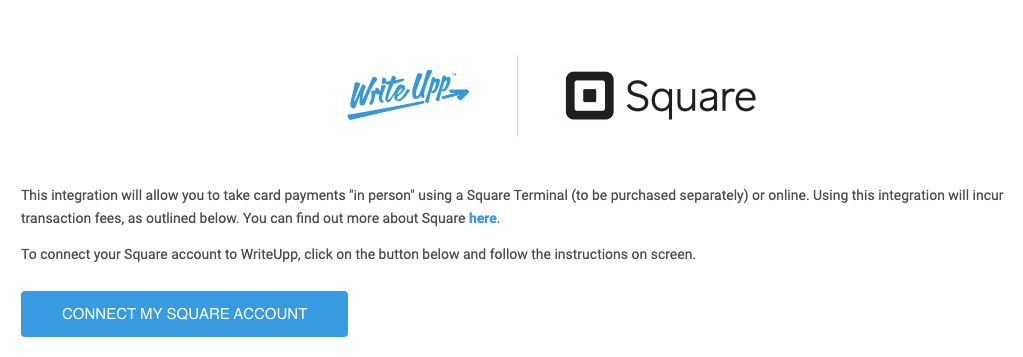
WriteUpp Pay extends that to in-clinic payments, with support for Apple Pay, Tap to Pay, and part-payments for patients on treatment plans. Every invoice is linked to the patient record and stored securely in line with GDPR requirements and ISO 27001 certification.
You can also customise invoices with your logo, adjust VAT settings, and set your preferred payment terms, all within the same system you use to run the rest of your practice. This billing integration means there is no third-party invoicing tool to manage separately, no duplicate data entry, and no chasing payments with a spreadsheet.
Start streamlining your invoices today
The hours you spend managing invoices manually are hours that could go back into patient care, or simply back into your day. Private practice billing software is not a luxury for larger clinics; it is what keeps your cash flow predictable and your admin manageable, whatever the size of your practice.
If your current process involves spreadsheets, standalone tools, or too much manual follow-up, it is worth seeing what a connected, purpose-built system looks like in practice.
Start your free 30-day trial and see how much easier invoicing can be. No credit card required.
Frequently asked questions
What should a private practice invoice include?
Every healthcare invoice should clearly identify the patient by full name and date of birth, alongside your clinic name and practitioner registration details. From there, it needs a breakdown of the services provided, including treatment dates and fees, VAT information if applicable, and your payment terms with a clear due date. The clearer the invoice, the less back-and-forth you have with patients over what they owe and when.
How does WriteUpp handle secure payment processing for healthcare invoices?
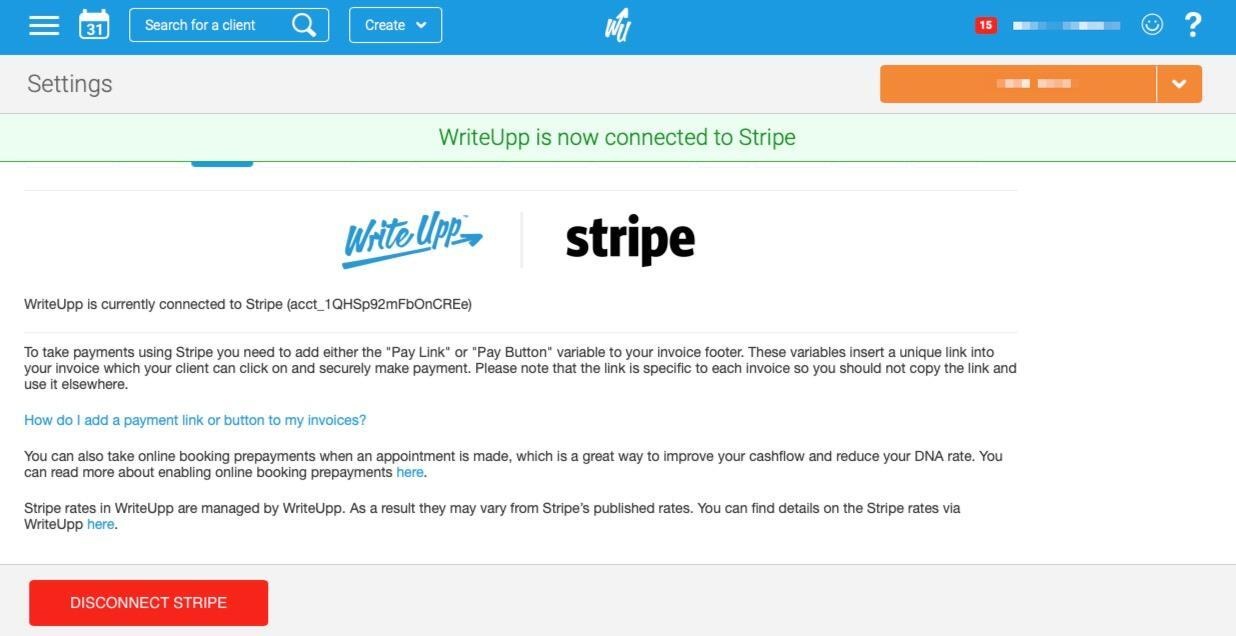
WriteUpp connects with Stripe for online payments, which meets PCI DSS compliance standards for card processing. Invoice data and patient information are stored in line with GDPR requirements, and WriteUpp is ISO 27001 certified. If you want the full picture on how data is protected, the security page covers it in detail.
Can I add VAT to invoices in WriteUpp?
Yes, and it is straightforward to set up. You configure VAT in your account settings once, and it applies automatically each time you raise an invoice. Patients see it as a clear line item rather than a rolled-up total, which tends to avoid confusion. For healthcare providers where some treatments are VAT-exempt and others are not, you can set this per service type so the right rate goes on the right invoice without you having to think about it each time.







Join over 50,000 clinicians that we've helped using WriteUpp
Start my free trial