
List of payment methods: Best online options for your practice
Key Takeaways
- Most patients now expect card and contactless payment options because these methods have become the norm across Canada
- Upfront payment at booking protects your schedule and revenue by cutting no-shows before they happen
- Digital payment methods get funds into your account faster than bank transfers or checks ever could
- When your payment system talks to your patient records, invoices update themselves and month-end reconciliation becomes simple
- Pay-by-link lets patients settle invoices on their time, which means less chasing payments and fewer interruptions to your day
Running a private clinic means juggling a lot. If you've ever spent hours chasing late payments or untangling payment mix-ups, you know how frustrating it gets. The payment methods you offer directly affect how quickly you get paid and how much admin piles up.
This guide covers direct and online patient payment options that fit modern clinic life. Cash and checks? They're still around, but they create extra work and don't play well with digital systems. Choosing the right payment methods comes down to two things: what patients expect, and which options make your operations smoother.
Why online payment methods matter for private clinics
Your payment options have a real impact on how smoothly your clinic runs. Get this right, and invoices get paid faster with fewer unpaid bills. When patients can pay online or through a payment link, they settle up without waiting for the reception to open.
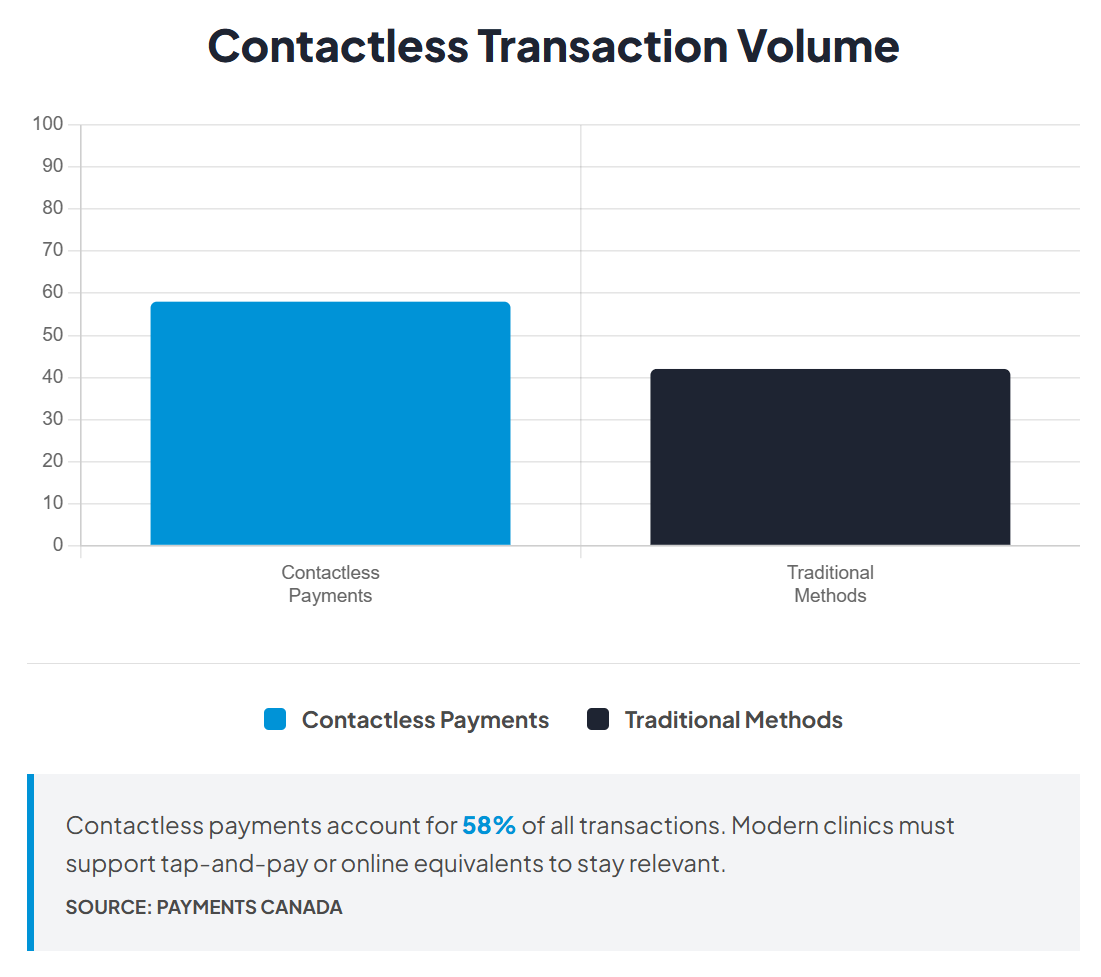
Digital payment adoption is strong across Canada. Digital payments now represent 86% of all payment volume, with contactless payments accounting for 58% of transactions. Most patients expect these convenient payment options now.
Deposits or prepayment make a real difference with no-shows. Canadian healthcare studies show no-show rates ranging from 10% to 25% across different practice settings. When patients have already paid, they're far more likely to turn up, protecting your schedule and revenue.
Self-serve payment options cut the time spent chasing. Clear confirmations mean fewer "Did my payment go through?" interruptions.
Patients expect to pay via payment links or online portals. Nearly half of Canadians (49%) find real-time payments appealing, with over one-third ready to switch from current payment methods for faster, more convenient transactions.
How to choose the right payment methods
Think about what you need each payment option to do. The right framework helps you choose methods that work for your operations and patients.
Security and compliance basics
Use trusted payment providers with secure payment gateways rather than handling card details directly. This reduces compliance burden and keeps patient payment data secure through built-in fraud protection.
Limit who can access payment records and maintain an auditable trail. Keep refund and dispute processes clear.
Patient experience and accessibility
Offer at least one fast, familiar option like credit and debit cards and one flexible self-serve option like pay-by-link.
Mobile-first behaviour supports digital wallets. Many patients prefer paying from phones, so methods that work smoothly on mobile improve the checkout experience.
Card-on-file and recurring options reduce repeat admin for returning patients. Make confirmation and receipts clear to prevent follow-up questions.
Fees, payouts, and reconciliation
Transaction fees vary by method. Card-present payments often have different fee structures compared to online card transactions.
Payout timing matters for cashflow. Digital payments transfer funds faster than traditional methods like Interac e-Transfer or checks, improving cashflow and reducing time spent chasing invoices.
The best systems link payments to the right patient record automatically, saving hours at month-end.
Integration with practice management software
Integration makes payment methods operationally useful. Good integration means payments link to the correct invoice and patient record automatically while maintaining PCI DSS compliance.
Invoice status updates reduce manual chasing. Payment confirmations and receipts are easy to access, and month-end reporting is simpler.
List of online payment methods for private clinics
Most clinics need a mix of methods. Patients pay differently depending on appointment type, value, and timing.
Payment method
What it is
Best for
Clinic benefits
Watch-outs
Operational note
Card payments
Debit or credit card transactions
In-clinic checkout and deposits
Fast, familiar, supports online use
Disputes need clear processes
Links to invoices reduce reconciliation
Digital wallets
Apple Pay, Google Pay, similar
Mobile-first self-serve payments
Faster checkout, less friction
Must still map to records
Works well for phone payments
Bank transfer
Direct bank-to-bank payment
Higher-value invoices, patient preference
Less friction for some patients
Confirmation can be slower
Clear references prevent admin time
Direct debit
Automatic recurring bank payments
Recurring care or treatment plans
Predictable cashflow, fewer missed payments
Communication must be clear
Records stay consistent when set up
Pay-by-link
Payment links sent via email or text
Post-session or invoice payments
Self-serve without phone calls
Links must tie to right invoice
Supports deposits, reduces no-shows
Payment plans
Instalments over agreed period
Higher-cost services or treatments
Improves affordability, predictable collection
Terms must be consistent
Reminders reduce missed payments
Card payments
Credit and debit cards are what most patients feel comfortable with. They're brilliant for in-clinic checkout and taking deposits at booking.
They work online and in person, giving you flexibility. When disputes crop up, having a clear process makes all the difference.

When card payments link to invoices, patient records update automatically. No manual entry, time saved at month-end.
Digital wallets
Digital wallets like Apple Pay and Google Pay make mobile payments faster and smoother. Patients who use them regularly appreciate how hassle-free it is, especially when paying from phones.
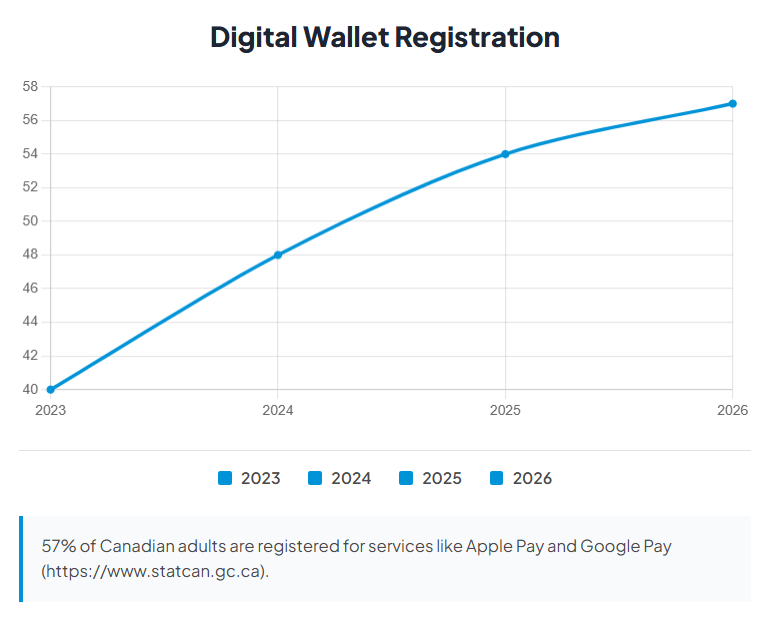
Contactless tap-to-pay technology has become mainstream in Canada, with adoption growing year over year. These wallet payments still need to map cleanly back to your invoices and patient records. The convenience only becomes a real benefit when your system tracks everything properly.
Bank transfer options
Bank transfers work well for higher-value invoices or when patients prefer paying that way. Some find them easier than cards for larger amounts, though confirmation takes longer.
Clear payment references are key. When patients include the right reference, staff match payments quickly. Without it, manual confirmation creates extra admin time.
Direct debit for recurring care
Direct debit creates a predictable income for recurring treatment plans. Set up correctly, it reduces chasing payments and missed instalments.
Clear communication matters. Patients need to understand what they're agreeing to and when payments are taken. Good systems update accounts automatically when payments come through.
Pay-by-link and online invoice payments
Pay-by-link is one of the most practical online methods. It supports self-serve payment without phone calls or manual processing.
Patients pay quickly after sessions or directly from invoices. This reduces delays and lets patients settle bills on their schedule. Pay-by-link supports deposits and reduces no-shows when used at booking.
Payments should update the correct patient account automatically. Refund handling needs a consistent process to keep accounts accurate.
Payment plans and instalments
Instalment payments make higher-cost services more accessible. They improve affordability and reduce delayed payments for higher-value treatments.
Payment plans support patient access while keeping cashflow predictable. Consistent terms, regular reminders, and clear processes for missed payments make them work.
How to integrate payments into your clinic workflow
Understanding how payment methods fit into your day-to-day operations helps you pick the right mix and cut admin time. Here's what a practical payment flow looks like:

- Booking and confirmation: Decide whether you're asking for payment at booking or later. For high-value appointments or patients with a history of no-shows, upfront payment helps. Clinics have a 70% chance of collecting payment at the time of service compared to just 30% when they send invoices afterwards. For established patients with regular appointments, pay-later usually works fine.
- Invoice creation and payment request: Once you've created the invoice, patients need an easy way to pay. A pay link in the invoice email does the trick when you've set up online payments correctly.
- Payment confirmation and receipt: Patients get immediate confirmation with an accessible receipt. This cuts down on "Did my payment go through?" questions.
- Refund handling and record updates: When you process refunds, invoice status updates automatically, keeping invoices aligned with actual transactions.
- Reconciliation at month end: Good systems link payments to invoices automatically. Records match actual payments without manual checking.
For example, a physiotherapy clinic might take deposits for initial assessments but let established patients pay after follow-up sessions.
Streamline payments with WriteUpp and Stripe
Introducing the Stripe Terminal: The Easiest Way to Take Payments!
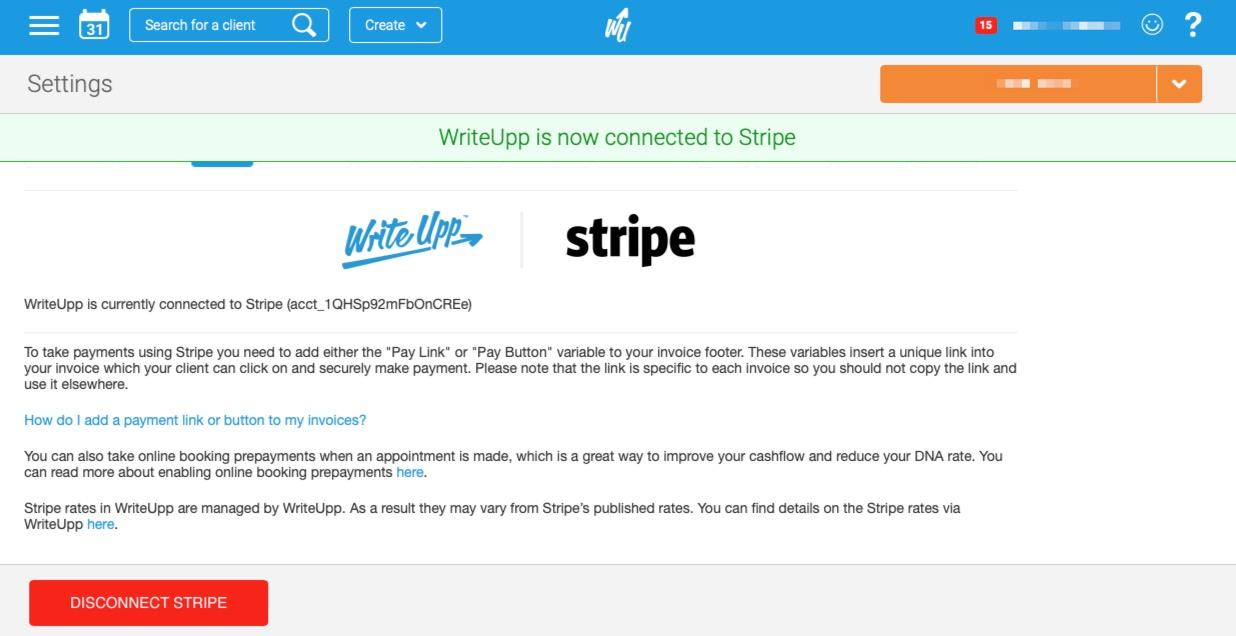
WriteUpp's payment processing makes it straightforward to offer multiple payment methods without complicating your workflow. The system works with Stripe to handle secure transactions while keeping records accurate.
Online invoice payments work through a pay link. Patients get an email with clear payment options, and invoices update automatically in WriteUpp once paid.
Taking payment at booking reduces no-shows. When patients have already paid, they're far more likely to show up, protecting your schedule and revenue.
In-clinic payment support includes card readers and contactless options. Transactions link straight to the correct patient record without manual entry.
Funds land in your Stripe account first, then transfer to your business bank based on your payout schedule. Typically seven days, though manual settings are available.
When you process refunds in Stripe, clinic records update accordingly. Everything stays accurate, showing which invoices are fully paid, partially refunded, or cancelled.
Make payment simpler for patients and staff
Choose a balanced mix that patients can complete quickly and staff can track without workarounds. When payments link to invoices automatically and records update in real time, your team has less work and fewer mistakes to fix.
WriteUpp brings your payment mix and workflow together, handling the technical side while keeping records accurate and admin time down.
Ready to simplify how your clinic gets paid? Try WriteUpp free and see the difference.

.png)

.png)
%20(2).png)



Join over 50,000 clinicians that we've helped using WriteUpp
Start my free trial