
How to build a patient experience survey that leads to better care and satisfaction
Key Takeaways
- Patient experience surveys tell you what actually happened during care, not just whether patients were satisfied with their expectations
- Keep surveys short with 5-10 questions maximum - longer surveys put people off and you'll get fewer responses back
- Timing matters - send your survey within 24-48 hours of the appointment while it's still fresh in their mind
- Text messages get opened and read far more reliably than emails when you're chasing patient feedback
- Close the loop by showing at least one visible change you've made from feedback - it builds trust and keeps future responses flowing
A patient experience survey should surface clear issues you can fix and confirm when changes are working.
This guide shows Canadian private clinics how to design patient experience surveys, when to send them, and how to close the loop so patient experiences improve.
What is a patient experience survey and why it matters in UK healthcare
A patient experience survey in healthcare is a feedback tool that captures what patients notice during their journey. It focuses on specific touchpoints across the patient journey like booking, communication, staff behaviour, privacy, facility cleanliness, and billing and administrative support.
Most surveys mix a small set of rating questions with one or two open prompts. This gives you survey results you can track over time and comments that explain what needs attention. Many patients will recognize formats from patient feedback tools used across Canadian healthcare systems.
Recent Canadian data shows the impact of patient information access on healthcare engagement. More than 4 in 5 Canadians felt better able to manage their health after accessing their electronic medical records, demonstrating how transparent feedback and data access drive patient empowerment and quality improvement.
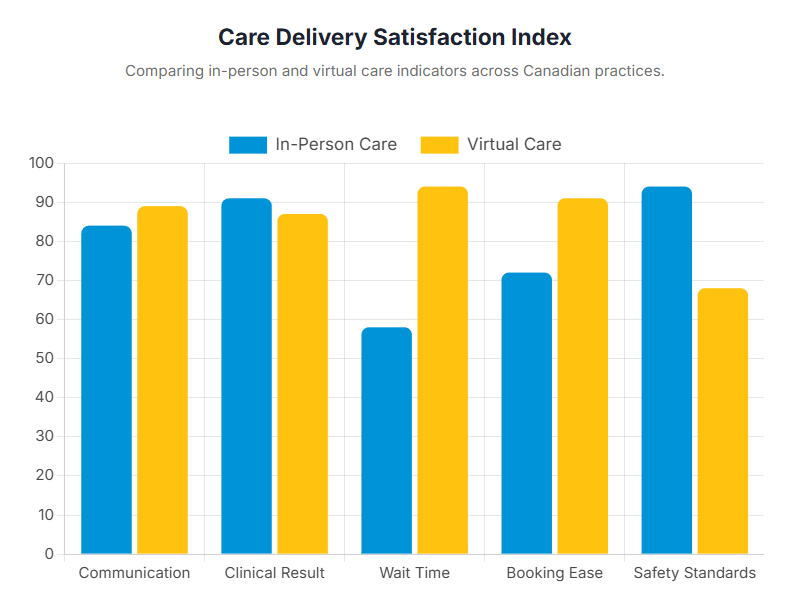
Patient experiences differ from satisfaction. While patient satisfaction surveys measure how well care met expectations, experience surveys focus on what actually happened during care. For private clinics, that difference turns feedback into practical changes that support quality of care and patient safety.
What makes a good patient experience survey
A good survey is designed for action. It's clear and specific, so patients can answer quickly and you can interpret results without guesswork. Use neutral wording, a small number of rating questions to track consistency, and one free-text prompt to capture context. Include "not applicable" where needed so responses stay accurate.
Common survey mistakes that waste feedback
- Long surveys lead to drop-off or rushed answers
- Leading language inflates results and hides issues
- Closed questions only remove context
- Poor timing affects recall
- Not acting on data reduces trust
Build a patient experience survey you can act on
1. Start with a clear goal for the survey
Start with the decision your clinic patient experience survey should support. That could be improving access, reducing confusion about next steps, or checking whether communication is clear.
Keep one primary goal per survey. If you measure everything at once, feedback becomes too broad to guide change.
Do this: Write a one-sentence goal, then remove questions that don't support it.
2. Pick the right time to send it
Choose a trigger that matches your goal: after a first appointment, after treatment, or after a video consultation. For best recall, send surveys within 24-48 hours of the visit. This timing window balances fresh memory with sufficient reflection time.
Avoid over-surveying. If every visit generates a request, response rates fall.
Do this: Choose one trigger point and apply it consistently.
3. Ask questions that reveal what's working and what needs fixing
Keep questions practical, focused on patient experiences rather than general impressions. Patient feedback tools used across Canadian healthcare systems capture experiences through simple, standardized questions that drive improvements.
Sample questions:
- How easy was it to book your appointment in the way you preferred
- Did you understand what would happen during your appointment
- After your appointment, did you know the next step and when it would happen
- What is one thing we could have done better
For open feedback, a text field works well when the prompt is specific.
Do this: Keep wording neutral and include one open question.
4. Keep it short but focused
Short surveys are easier to complete and easier to review. Aim for completion time under 10 minutes. For standard outpatient visits, this typically means 5-10 questions maximum. Research shows that patients who give low scores on provider questions are almost 7 times more likely to perceive a diagnostic breakdown, demonstrating that thoughtful survey design captures critical safety concerns alongside satisfaction metrics.
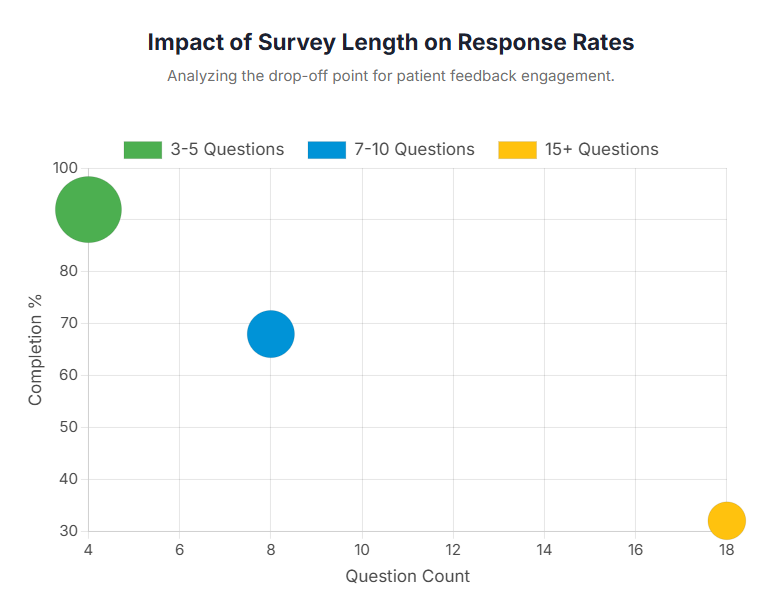
Use only the questions that connect to your goal, plus one open prompt for context. If you need depth on a specific topic, run a separate survey rather than expanding your core version.
Do this: Limit to 5-10 questions and test on mobile.
5. Choose the right format and channel
Match delivery to how patients already communicate with your clinic. Email works for some. Text messages work well for quick responses.
With 47% of Canadians now accessing their personal health information online, digital survey delivery aligns with growing patient comfort with healthcare technology. SMS typically achieves higher engagement than email, as text messages are read quickly and reliably.
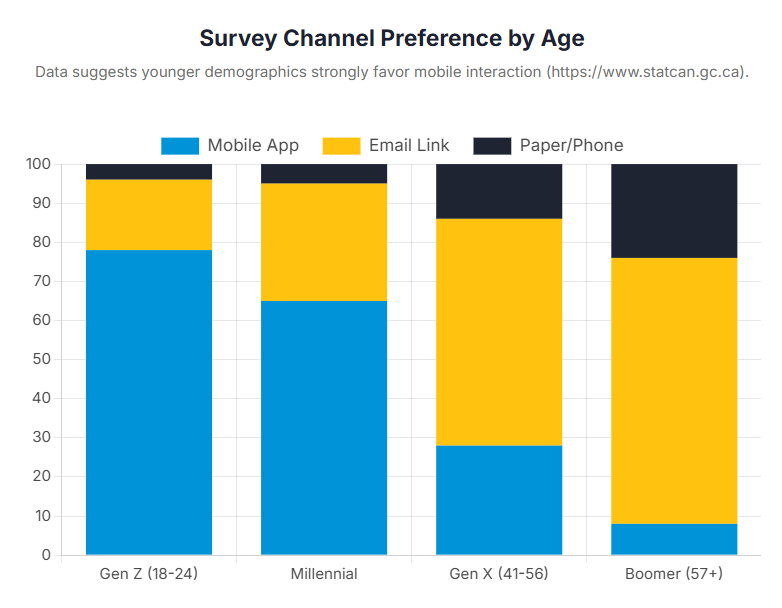
Design for mobile first. Clear spacing and readable text improve completion.
Do this: Choose one primary channel and make it mobile-friendly.
6. Automate feedback collection and track responses
Manual follow-up turns surveys into admin. Automation keeps the process consistent.
Tracking doesn't need to be complex. You need visibility on sends, completions, and top themes so you can adjust timing or wording.
Do this: Automate the send, then review weekly and adjust as needed.
7. Analyse themes in open-ended responses
Open comments contain the detail that drives improvement, but only if you review them consistently. Use simple tags: booking, wait times, clarity, privacy, staff behavior, and follow-up.
Look for patterns rather than one-off stories. Tag comments in spreadsheets or use an analysis tool to count themes and surface recurring issues. If you have other inputs, triangulating feedback across surveys, cancellations, and complaints can help you prioritise what to fix first.
Do this: Tag responses monthly and choose one theme to tackle.
8. Share results and close the loop
Closing the loop builds trust. Share key themes internally, then communicate one or two actions externally in plain language.
For example, if patients report confusion about appointment types, update your reminder texts to specify 'face-to-face appointment' or 'video consultation.' Follow your clinic's safeguarding processes for serious concerns.
Do this: Share one improvement you made and when you'll report back.
Ways to improve patient satisfaction using survey feedback
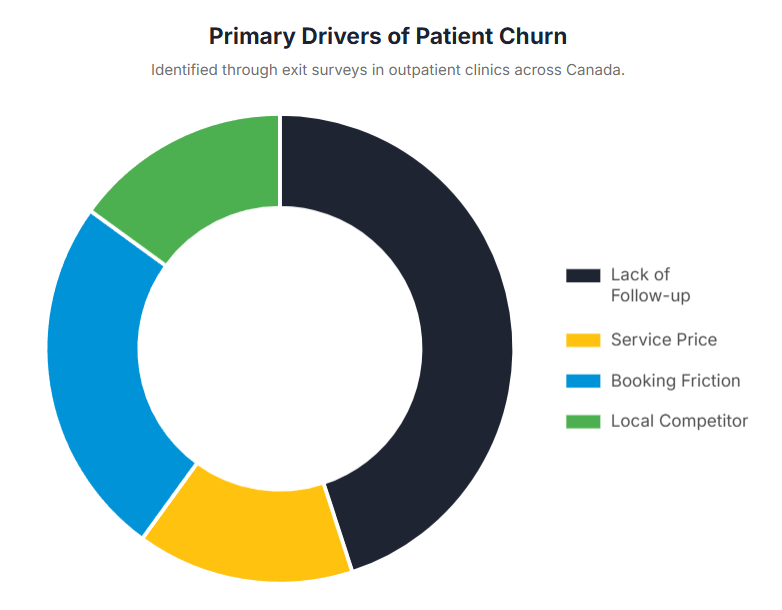
Survey responses work best when they lead to changes that patients can feel. Focus on improvements that reduce friction.
- Booking and access: Clarify appointment types and use efficient appointment scheduling.
- Communication: Standardize messages so patients receive clear, consistent communication and understand next steps. Effective communication is especially critical in Canada, where patients who don't speak English or French are 30% more likely to experience harmful events during healthcare encounters, highlighting the importance of clear, accessible feedback tools.
- Follow-ups: Confirm when the follow-up will happen and how patients can ask questions.
- Environment: Check what patients notice in reception and how confidential conversations are handled.
How WriteUpp supports patient experience surveys without adding admin
Many clinics stop collecting feedback because manual work adds up. WriteUpp keeps feedback workflow in one place, so you can standardise collection, storage, and review without adding admin.
Key features that support survey workflows:
- Smart forms: Send feedback forms online using reusable templates so results stay comparable.
- Online booking: Improve access at the first touchpoint and make survey timing predictable.
- Diary management: Keep appointments organised so survey sends align with appointment activity.
- Video consultation: Request feedback after remote appointments while keeping experiences consistent.
- Security: Handle sensitive feedback safely as part of everyday operations.
A clinic patient experience survey is easier to run when sending, storing, and reviewing are part of the same system.
Turn survey feedback into visible improvements patients notice
A patient experience survey works when it becomes routine. Collect feedback at the right moment, review on schedule, act on one theme at a time, and share what changed.
Make patient feedback work for your clinic. With WriteUpp, you can automate surveys, track responses easily, and show patients their voice matters. All in the system you already use for appointments and notes.
Try WriteUpp free for 30 days.
Frequently asked questions
Are there GDPR concerns with digital surveys
Yes. Surveys can include personal information, especially if linked to an identifiable patient. Keep collection minimal, explain the purpose clearly, store responses securely, and limit access to staff who need it. Offer an anonymous option when identity isn't needed. For detailed guidance, see the Office of the Privacy Commissioner of Canada's PIPEDA guidance.
What should clinics look for in survey tools
Look for tools that are mobile-friendly, simple to send, and easy to review. You should be able to track completion, group themes, and escalate issues when needed. The best tools support consistent workflows rather than one-off campaigns.
What are the key performance indicators in healthcare
KPIs track whether services are improving and where attention is needed. For patient feedback, clinics often track access, communication clarity, follow-up reliability, and responsiveness. Survey trends support these discussions by showing whether changes improve the patient journey.

.png)

.png)
%20(2).png)



Join over 50,000 clinicians that we've helped using WriteUpp
Start my free trial