
A guide to AI Medical Scribe for Therapists
Key Takeaways
- Documentation is a major time burden for therapists, often extending work beyond client sessions and contributing to burnout.
- AI Scribe helps therapists significantly reduce time spent on documentation, freeing up space for both personal time and additional client care.
- AI Scribe generates structured, editable notes instantly, reducing manual typing and improving consistency.
- By handling note-taking in the background, therapists can stay fully present and engaged during sessions.
- Designed to support therapists’ practice, AI Scribe keeps you in full control of your notes while making your workflow more efficient.
Therapists don’t enter the profession so that they can work overtime taking notes.
Yet, documentation is one of the most time-consuming tasks that therapists have to manage.
Between session summaries, treatment plans, appointments, and more, therapists often find that they’re working long past when their last client leaves, often taking away from the passion and drive that brought them to the profession in the first place.
But what if there was a way to reduce this workload without compromising quality or confidentiality?
That solution is AI Scribe, which WriteUpp has now launched, designed to give you your time back.
Let’s dive deeper into how WriteUpp’s AI Scribe can best suit you and your practice.
What is AI Scribe?
AI Scribe consists of digital tools that are powered by AI, using natural language processing to capture, transcribe, and summarize conversations in real-time.
Instead of staring at a blank page and wondering where to begin, AI Scribe provides you with structured, editable drafts, all in seconds.
In simple terms, this means:
- Less time typing
- More consistent documentation
- More focus on clients
AI Scribe is designed to be a tool that supports your practice, rather than replacing it.
Value of AI Scribe for Therapists
Who wants to put more time into paperwork when there’s a solution that gives you that time back?
As a therapist, having tools that support you—rather than slow you down—is essential.
WriteUpp’s AI Scribe is designed to do exactly that. Here’s why:
Get Your Time Back
Have you ever wondered what life might look like when you no longer have to spend hours of your week on documentation?
When you reduce time spent on notes and admin, you open up the door to more flexibility in how you spend your time.
That might look like:
- More moments with loved ones
- Space for personal projects or passions
- The freedom of taking on extra clients
Say goodbye to burnout, and say hello to self-care.
AI Scribe puts the time back in your hands—what will you do with it?
Focus Fully on Your Client
If you’ve ever felt guilty when taking notes during sessions but knew that you had no alternative, know that you’re not alone.
During sessions, therapists need to keep mental tabs on themes spoken about, how they’ll structure the note afterward, all while maintaining eye contact with the client and staying attuned.
AI Scribe changes this.
By handling documentation in the background, you can put your full attention on the client in front of you. No typing. And no mental multitasking.
As a result:
- Your mind becomes clearer
- You work more efficiently
- And your client feels more seen and supported
Therapists often don’t even realize the weight that manual documentation takes up until it’s gone.
Interested in giving it a try?
Let’s Get Started
- Log into your WriteUpp account
- Open a patient file
There are now three options that you can choose from:
- Notes
- Documents
- Assessments
For clinical notes and documents:
Your screen will look like this:

Click the microphone icon.
For assessments:
You can either create an assessment or choose a default one.
When creating your own assessment, you’re able to choose which layout best suits you.
You also have many fields to choose from:
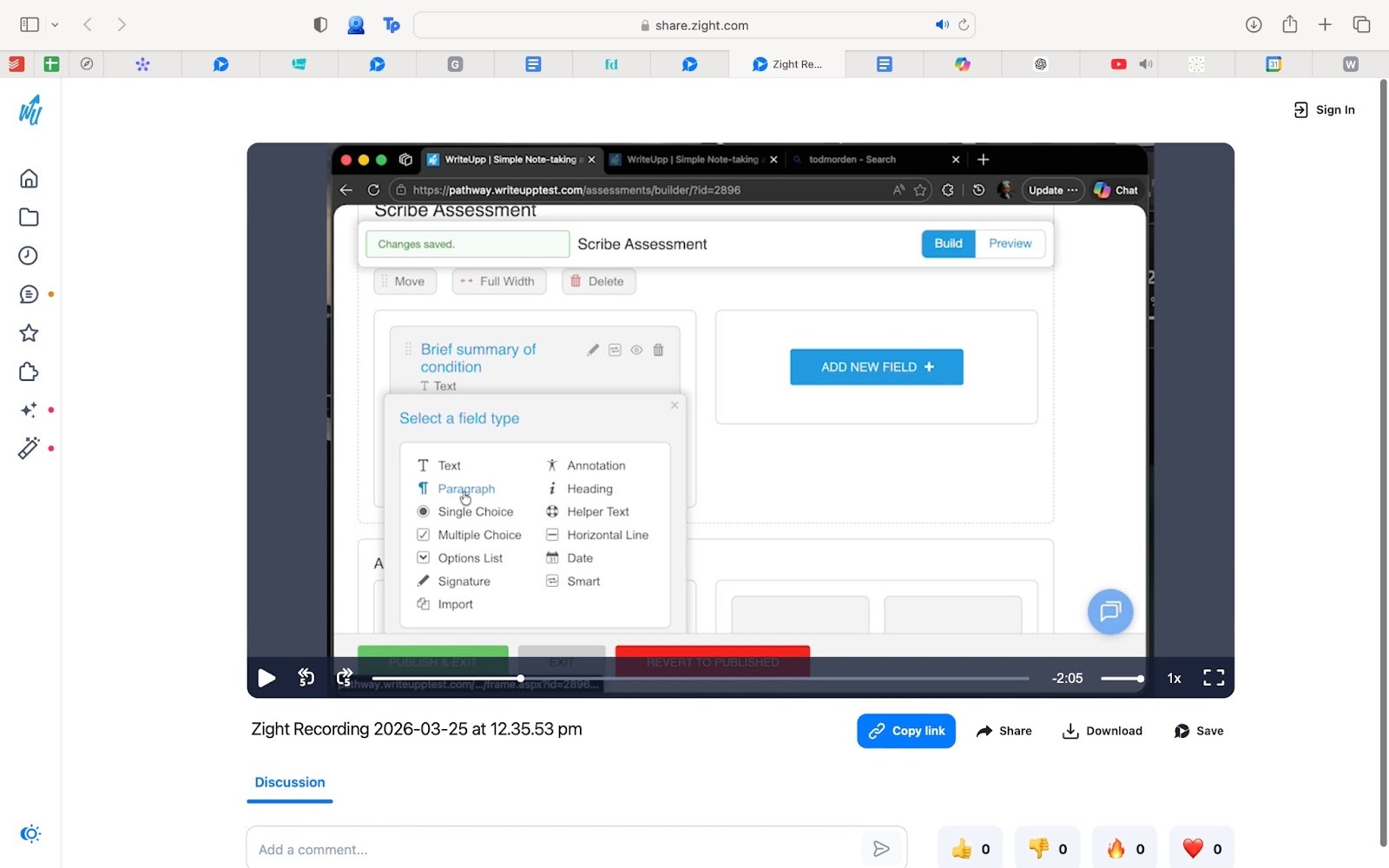
Here’s what using the fields might look like for you:
- Using the multiple choice field for mood rating scales, anxiety levels, or sleep quality
- Paragraph/text fields for a summary of the main problem in your client’s life or why they decided to go to therapy
- Options list for common triggers or coping skills that have worked
- Date field for follow-up or tracking on-going symptoms
Once you select the assessment you want to use, your screen will look like this:
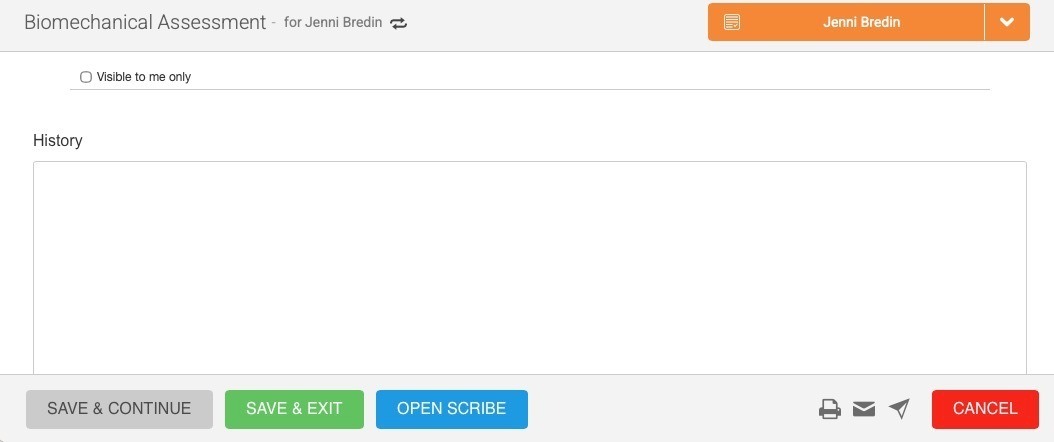
From there:
- Tap “Open Scribe”
From this point onwards, the three options bring you to the same spot.
You have the option of choosing either:
- Record Patient Encounter
- This option picks up the conversation in real-time.
- The difference with this format is that you’ll have to select your preferred note format (e.g. SOAP, DAP, BIRP, Brief Progress Note, or Free-Form)
Choose this option if:
- You have a busy schedule
- You prefer to finish a session with a draft of notes already waiting for you
- You want to stay hands‑on and avoid stopping to type
- You follow structured approaches (e.g. CBT or DBT)
- You want critical clinical findings or safety concerns documented and highlighted
or
- Dictate a Note
- This option allows you to talk about your session after it happens.
- No templates are used, what you vocalize is transcribed.
Choose this option if:
- Your client prefers not being recorded
- You prefer summarising the session in your own words once the appointment is finished
- You want to capture key details without typing everything manually
- You want a quick, efficient alternative to writing notes from scratch
After selecting your preferred method of using AI Scribe, you then tap the blue button to begin recording.
Note: Your microphone needs to be enabled for this to function. You will receive a pop-up upon first use. Ensure that you click accept.
When finished, tap “Stop & Generate Note.” Next, you have the option to review and edit your note, and then you can save it which automatically saves in the clients’ file.
Just like that, you’ve used WriteUpp’s new AI Scribe tool.
Final Thoughts
For many therapists, adopting AI into their practice can feel unfamiliar at first.
That’s why AI Scribe is designed to be intuitive and easy to integrate into your existing workflow.
It’s not about replacing the way you work, but enhancing your practice with tools that make your day-to-day feel lighter and more sustainable long-term.
If you’re interested, book a demo with us to see how AI Scribe can fit into your practice, helping you reclaim your time.

.png)

.png)
%20(2).png)



Join over 50,000 clinicians that we've helped using WriteUpp
Start my free trial