
Key Takeaways
- Going paperless is a gradual process and a phased approach by workflow is the most manageable way to make the switch.
- Paper-heavy practices carry real compliance risk and digital records are significantly easier to secure, audit and protect under PIPEDA and provincial privacy legislation.
- A paperless practice saves you time, money and physical storage costs without requiring you to change everything at once.
- Choosing PIPEDA-compliant, ISO 27001 certified software is the single most important decision when going paperless in private practice.
- Practice management software built for Canadian private practices handles the full paperless journey from electronic health records to smart forms, booking and payments in one place.
If you run a private practice, paperwork probably takes up more of your day than you would like. Between physical intake forms, paper-based session notes, manual invoices, and filing cabinets full of patient records, the admin load is real, and it keeps growing.
Going paperless in private practice is no longer a distant ambition. More Canadian clinicians are making the switch every year, and the results are consistent: less time buried in admin, fewer compliance headaches, and more time with the patients who need you.
This post covers why paperwork remains such a burden, the real benefits of going digital, how to make the switch step-by-step, and what to watch out for along the way.
Why UK private practices are still drowning in paperwork
No one got into healthcare to spend their evenings updating spreadsheets or chasing down misplaced consent forms. Yet for many private practitioners, that is exactly what is happening.
According to a 2026 national survey reported by Doctors of BC, Canadian physicians spend an average of 9.1 hours a week on administrative work, with nearly half of that time estimated to be unnecessary. Meanwhile, CIHI's 2024 shared health priorities data confirms that only 29% of physicians in Canada share patient clinical summaries electronically with care providers outside their own practice. If the broader health system is still on the journey toward connected digital care, it is no surprise that many private practices are too.
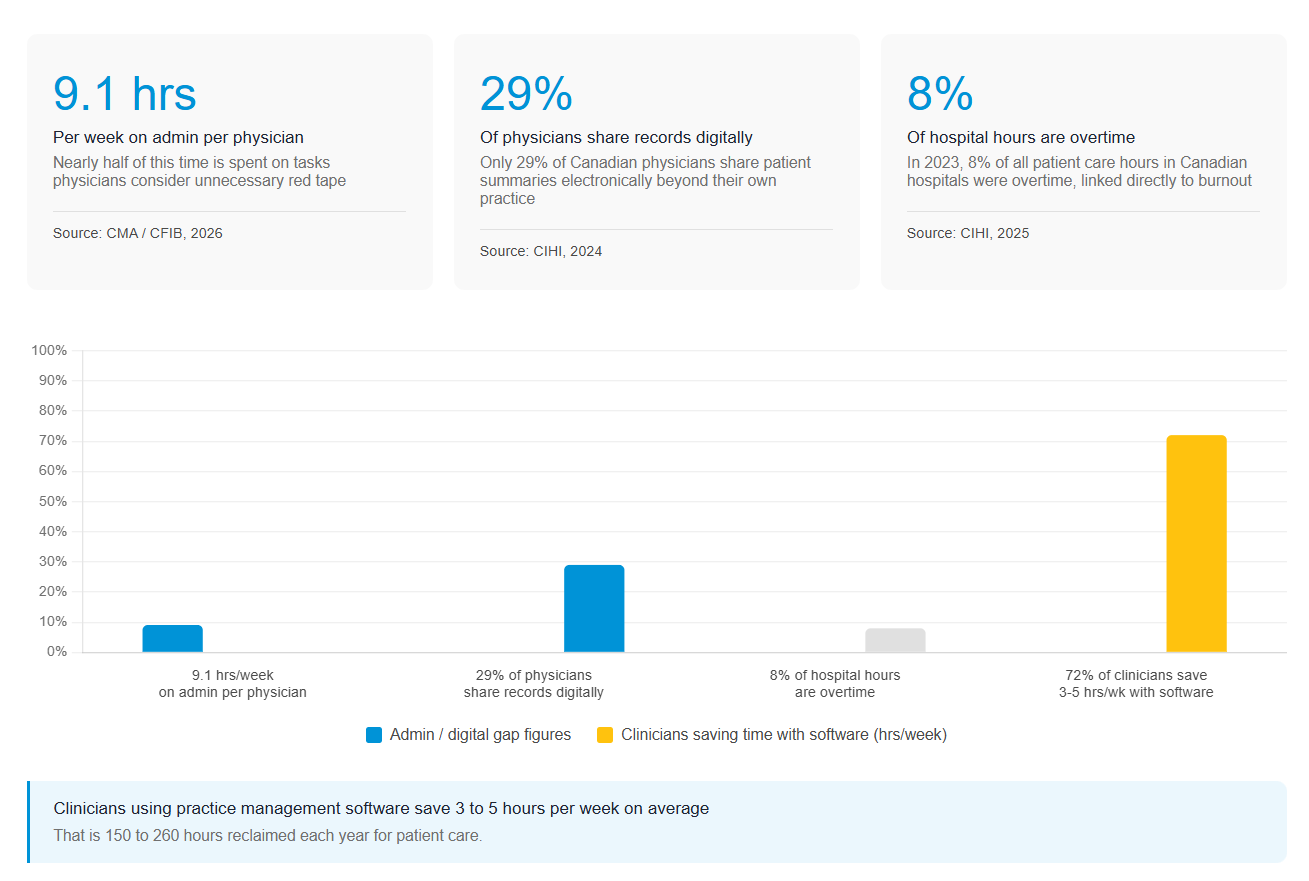
The consequences go beyond frustration. Heavy admin loads contribute directly to burnout. CIHI's research on health workforce overtime found that in 2023, 8% of total hours worked by patient care providers in Canadian hospitals were overtime, equivalent to 22.6 million hours, with sustained workloads consistently linked to burnout and staff retention challenges. In private practice, where you may be a team of one or two, those pressures hit even harder. Paper records also create real compliance risk: under PIPEDA and provincial privacy legislation, they are harder to secure, easier to lose, and far more difficult to audit than digital records.
Clinicians using practice management software save 3 to 5 hours per week on average. That is time you could spend with patients, rather than on paperwork.
Benefits of going paperless in private practice
It is worth being clear upfront: going paperless is a phased transition, not an overnight switch. Even the broader Canadian health system, with its significant public resources, is still midway through its own digitization journey. For private practice, taking a gradual, workflow-by-workflow approach is not just acceptable. It is the smarter way to do it.
What matters is the direction of travel. Here is what moving to a paperless practice delivers:
- Improved efficiency. Less time filing, searching for documents, and manually updating records means more time doing the work that matters. Automated scheduling, digital notes, and online forms cut the repetitive tasks that eat into your day.
- Real cost savings. Paper, toner, printing, and physical storage all carry a cost. Going digital reduces or removes these expenses entirely.
- A better patient experience. Modern patients expect digital convenience. Online booking, digital forms completed before appointments, and fast secure communication create a smoother, more professional experience.
- Accessibility from anywhere. Cloud-based records let you access patient information securely from any device, whether you are at the clinic, at home, or between locations.
How to go paperless in your private practice
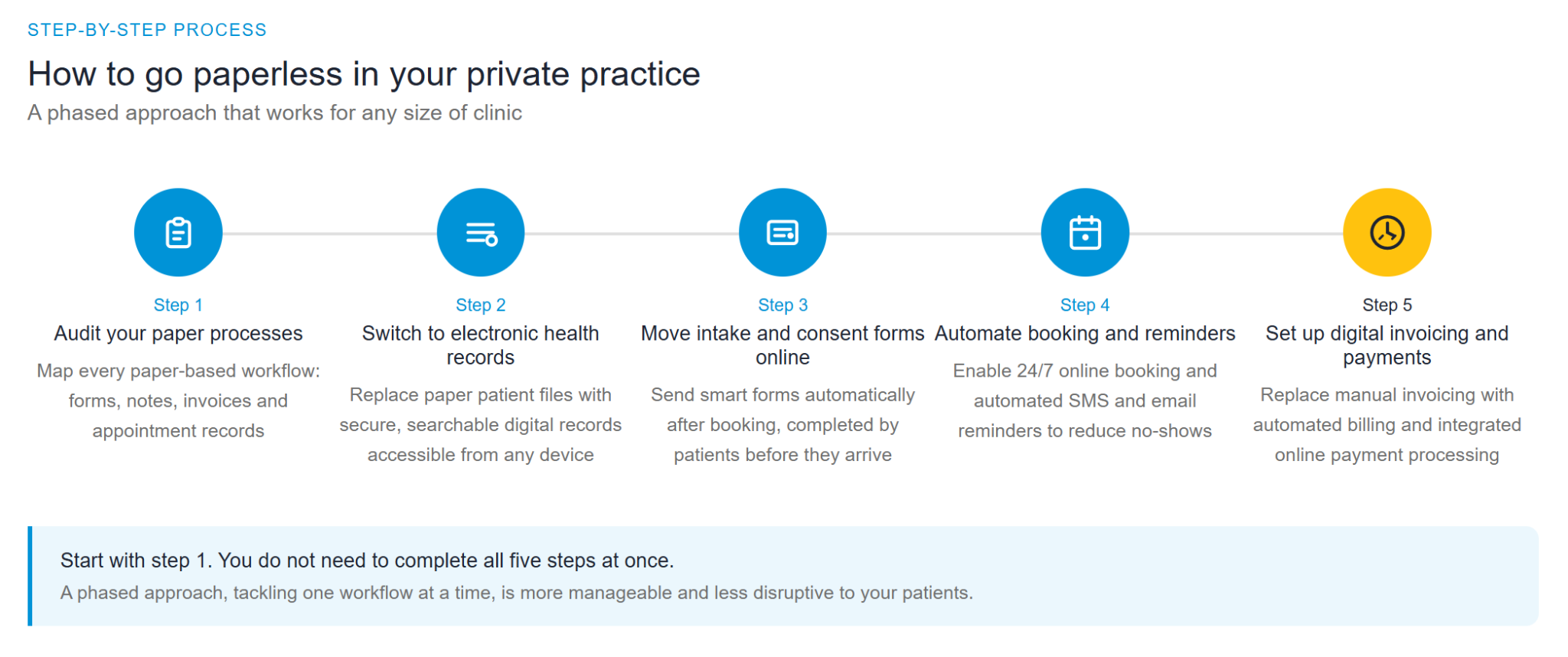
Step 1: Audit your current paper processes
Before you switch anything, map out where paper actually lives in your practice. Think about intake forms, consent documents, session notes, invoices, and appointment confirmations. Start with the highest-volume tasks first, as these are where going digital will have the biggest immediate impact.
For existing records, plan to scan and upload legacy files to your new system and shred physical copies once confirmed. The Office of the Privacy Commissioner of Canada's guidance on personal information retention and disposal sets out best practices for how long information should be kept and how to dispose of it securely. Read this before you start shredding anything.
Step 2: Switch to electronic health records
Electronic health records (EHRs) replace paper patient files with a secure, searchable digital record for every client. All notes, documents, appointment history, and communication sit in one place, accessible from any device.
Going digital with your records is not just about convenience. It strengthens your compliance position. Patient data stored in a certified cloud system is encrypted both in transit and at rest, backed up automatically, and protected by access controls. That is a significant upgrade on a filing cabinet.
EHR systems also provide audit trails, showing who accessed or updated a record and when. This supports both data protection compliance and clinical accountability.
Step 3: Move patient intake and consent forms online
Smart forms sent automatically after booking allow patients to complete registration details, medical history, and consent documents before they arrive. Responses flow directly into their client record, with no manual data entry required.
Patients already expect to communicate digitally via SMS and email rather than phone calls or paper post. Sending forms before arrival meets that expectation from the first touchpoint and reduces in-session admin so you can focus on the consultation itself.
Step 4: Automate appointment booking and reminders
Online booking gives patients the ability to manage their own appointments 24 hours a day, removing phone tag and manual confirmation entirely. Automated SMS and email reminders sent in advance reduce no-shows significantly, protecting your schedule and your revenue without any manual effort.
Step 5: Set up digital invoicing and payments
Replace manual invoicing with automated billing that generates and sends invoices as soon as an appointment is completed. Integrated payment processing means patients can pay online, reducing the time you spend chasing outstanding balances and improving your cash flow.
Common mistakes to avoid when going paperless
Choosing software that is not PIPEDA compliant. The consequences go beyond fines. A data breach damages patient trust in ways that are hard to recover from. Before committing to any system, confirm it holds ISO 27001 certification and is fully compliant with PIPEDA and applicable provincial health privacy legislation.
- Trying to do everything at once. A phased approach is far more manageable. Start with one workflow, get comfortable, and then expand.
- Skipping staff onboarding. Even the best system fails without team confidence. Build in proper training time before going live, and make sure everyone understands the new workflows before the old ones are removed.
- Forgetting to update your privacy notice. Going digital means revisiting how you communicate data processing to patients. Your privacy notice should reflect how and where their data is now stored.
How WriteUpp helps your practice go paperless
WriteUpp is built specifically for UK private practices, which means every feature is designed around the realities of clinical work, not adapted from a generic business tool.
Philip Newton, a physiotherapist at Newton Physiotherapy in Saltburn, wanted a paperless, web-based system that would remove the headaches of PC-based software. After switching to WriteUpp, his admin workload dropped significantly. Clinical note-taking became faster, and collating financial data for accounts was far simpler than with his old paper systems.
As Philip puts it: "The WriteUpp learning curve isn't steep, and the system is designed to take minimal administrative effort, which is vitally important to clinicians who want to maintain a healthy clinic-to-admin time balance."
Here is how WriteUpp supports each step of the paperless journey:
- Electronic health records stored in a single ISO 27001-certified, GDPR-compliant system, with customizable templates for clinical notes and full audit trail functionality.
- Smart forms sent automatically after booking, completed by patients before their appointment, and saved directly to their client record.
- Diary management with an intuitive calendar, integrated waiting lists, and automated SMS and email reminders to keep your schedule full and reduce no-shows.
- Online booking with 24/7 availability and automated SMS and email reminders built in.
- Automated billing with Stripe-integrated payment processing, so invoices go out and payments come in without manual intervention.
- Cloud-based clinical management from any device, anywhere, so your practice moves with you.
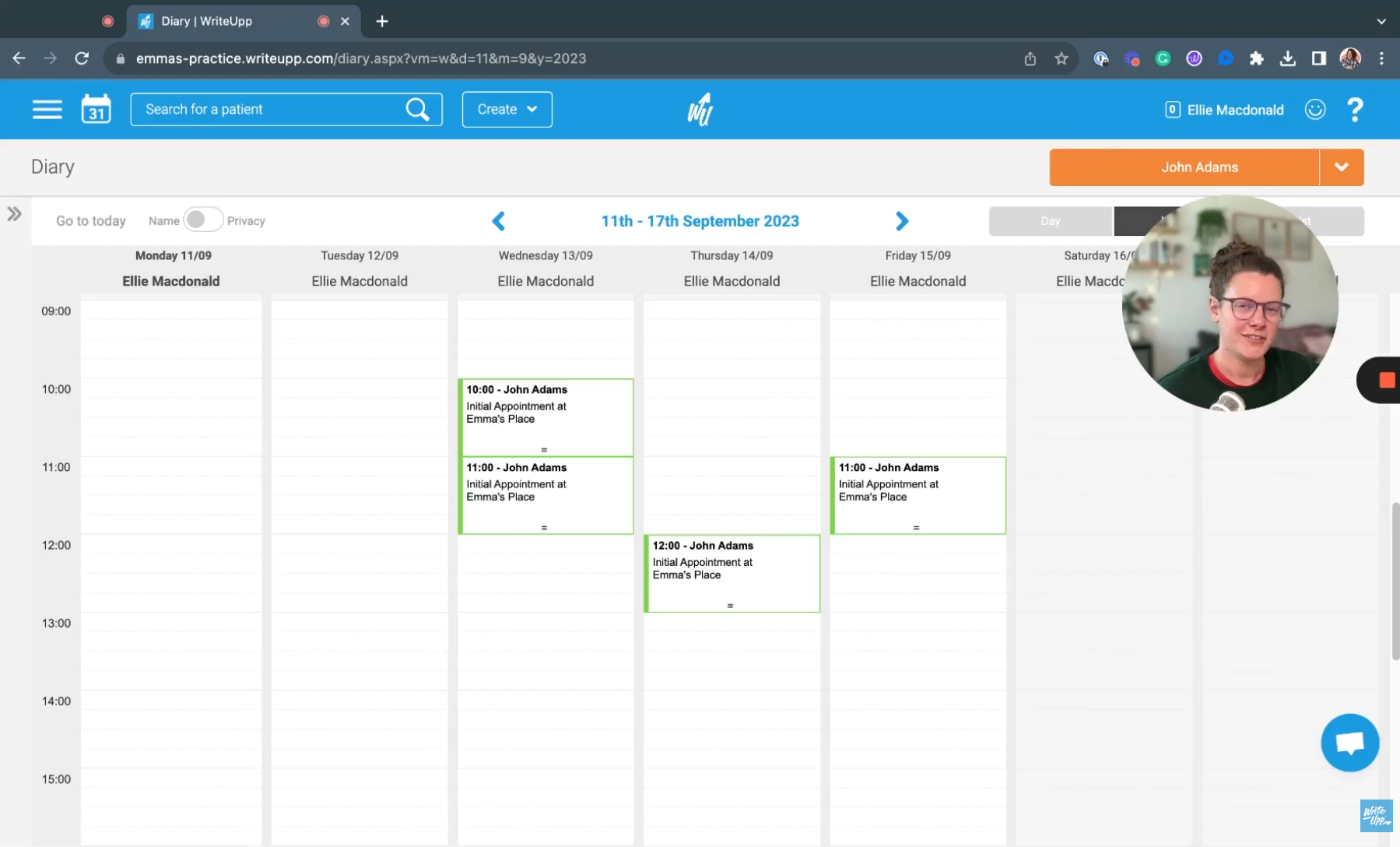
How to set up assessment forms in WriteUpp
Your paperless practice starts today
Going paperless in private practice is not a single decision. It is a series of practical, well-planned changes that compound over time. Each step you take removes friction from your day, strengthens your compliance position, and creates a better experience for your patients.
The clinicians who make this shift consistently report the same outcome: less time on admin, more time on care.
Ready to see what that looks like in your practice?
Start your free 30-day trial of WriteUpp and find out how much time you could reclaim.
Frequently asked questions
Is going paperless in private practice expensive?
The time savings and reduction in admin errors typically offset the investment quickly. Most practice management systems offer transparent monthly pricing with no hidden fees. You will also eliminate ongoing costs for paper, printing, and physical storage.
How long does it take to go paperless?
A phased approach typically takes a few weeks to a few months, depending on practice size. Starting with one area, such as online booking or digital forms, makes the transition manageable and builds confidence before you move on to the next step.
Do I need to keep any paper records at all?
Some records may still need to be retained physically, depending on your province and profession. Retention requirements for private practitioners are set by your provincial regulatory body and can vary depending on your discipline, so check with your college or association before destroying any physical files.
Is a paperless practice GDPR compliant?
Yes, when the right software and processes are in place. Look for ISO 27001 certification and confirm that the system includes built-in data protection and secure cloud storage. A compliant practice management system handles this by default.

.png)

.png)
.png)


Join over 50,000 clinicians that we've helped using WriteUpp
Start my free trial