
Practice management software for private practices typically costs from around $25 to $100+ per month, depending on the provider, number of clinicians, features and add-ons. WriteUpp's US plans currently start at $24.95/month, while other popular platforms start at $49–$69/month.
If you're comparing practice management software, the monthly subscription price is probably one of the first things you want to know.
But looking at the headline price alone can be misleading.
One platform might charge a flat monthly fee, another might price per clinician, while a third might offer a lower starting price but charge extra for features such as appointment reminders, electronic claims, AI tools or additional users.
So, how much does practice management software cost in the US?
For a private practice, current prices from popular platforms range from around $25 to $100+ per month for entry-level plans, with costs increasing depending on the number of clinicians, features and add-ons you need. For example, WriteUpp currently starts at $24.95/month for Flex and $43.95/month for Solo in the US, while SimplePractice starts at $49/month, TherapyNotes at $69/month for solo practices and Jane at $54/month for its Balance plan.
But price isn't the only thing worth comparing.
Here's what you need to know before choosing software for your practice.
Key takeaways
- Practice management software for US private practices can range from around $25 to $100+ per month, depending on the provider, plan and features you need
- The cheapest monthly subscription isn't necessarily the cheapest option overall
- Check whether features such as online booking, reminders, payments, billing, AI tools and additional users are included or charged separately
- Group practices should pay particular attention to per-clinician pricing, as costs can increase as your team grows
- WriteUpp offers US plans starting at $24.95/month, with a 30-day free trial and no credit card required.
What does practice management software cost in the US?
There isn't one standard price for practice management software.
Pricing varies depending on the provider and the type of practice it is designed for.
As a general guide, you can expect to see:
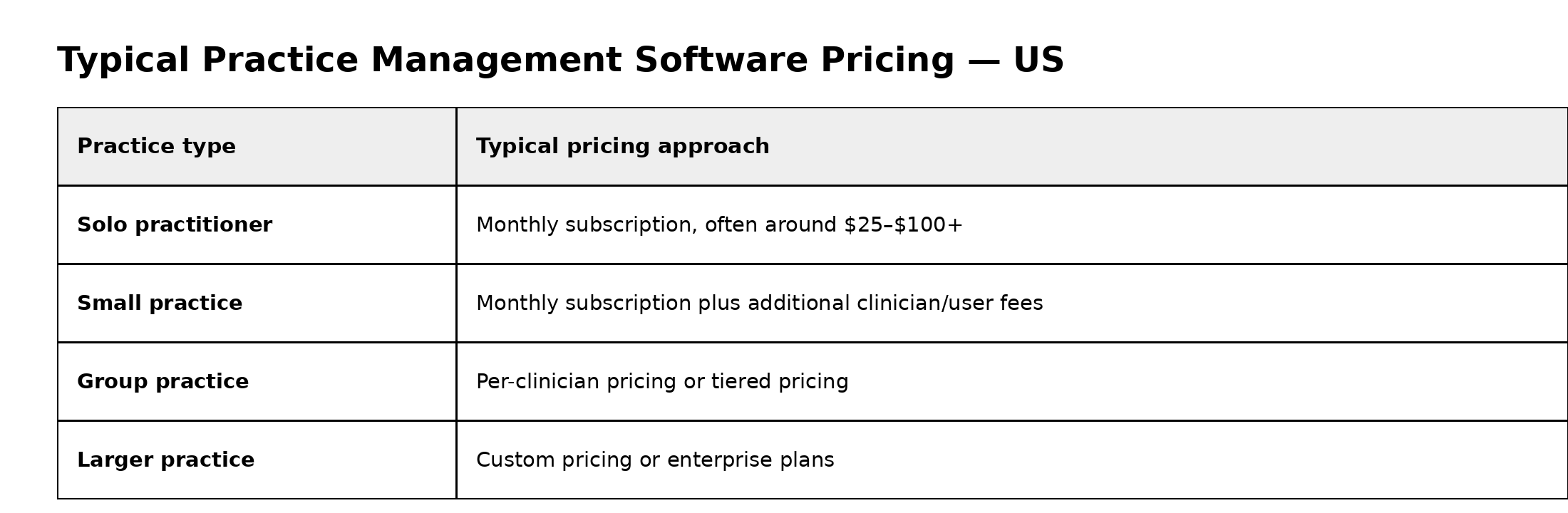
These are broad ranges rather than fixed market rates. Features, user numbers and billing models vary significantly between providers.
For example, current advertised US pricing includes WriteUpp from $24.95/month for Flex, SimplePractice from $49/month for Starter, TherapyNotes at $69/month for a solo subscription and Jane from $54/month for Balance.
Some providers also offer promotional pricing, so always check the standard rate you'll pay after any introductory offer ends.
Practice management software pricing comparison
Looking at a few established platforms gives you a better idea of the range of pricing available.
Prices checked in September/October 2026 and may change. Taxes, add-ons and additional users may apply.
WriteUpp's current US pricing includes Flex from $24.95/month, Solo from $35.95/month and Group from $59.95/month. Its plans differ in how users are charged, with non-clinical users included on Solo and Group plans.
SimplePractice currently lists Starter at $49/month, Essential at $79/month and Plus at $99/month. Additional clinicians can be added to Plus plans, with per-clinician pricing depending on practice size.
.png)
Jane currently lists Balance at $54/month and Practice at $79/month, with pricing for additional practitioners depending on their booked hours.
Pricing models aren't directly comparable, though. A lower starting price doesn't necessarily mean a lower total cost once you've added the features and users your practice needs.
What affects the cost of practice management software?
The monthly subscription is only one part of the calculation.
Here are some of the factors that can affect your total cost.
1. Number of clinicians
The size of your practice can make a significant difference.
A solo practitioner may pay one monthly subscription, while a group practice might pay based on the number of clinicians using the system.
Some providers offer unlimited or free access for non-clinical users, while others charge for every user.
For example, WriteUpp's Group plan includes unlimited non-clinical access, while clinical users require individual licences.
If you're running a group practice, don't just look at the price for one clinician.
Calculate the total monthly cost for your actual team.
2. Features included in your plan
Two platforms might have similar monthly prices but very different feature sets.
Check whether your subscription includes the things you actually need, such as:
- Digital client records
- Clinical notes
- Online booking
- Appointment reminders
- Digital forms
- Billing and invoicing
- Payment processing
- Telehealth
- Client portals
- Reporting
- Insurance billing
- AI documentation tools
For example, SimplePractice's Essential plan currently starts at $79/month and adds features such as appointment reminders, calendar sync and secure client messaging compared with its Starter plan.
3. Add-ons
Some platforms charge separately for certain features.
This can include:
- AI note-taking
- ePrescribing
- Telehealth
- SMS
- Insurance claims
- Online booking
- Additional storage
- Advanced reporting
SimplePractice, for example, currently lists Note Taker at $35/month as an add-on and ePrescribe at $49/month per clinician, plus a one-time setup fee.
WriteUpp also offers optional add-ons, including online booking on its Flex plan and AI Medical Scribe.
That's why comparing the total cost of the setup you actually need is more useful than comparing starting prices alone.
4. Insurance billing and claim fees
If your practice bills insurance, check whether electronic claims are included in your subscription or charged separately.
These fees can be particularly important for practices submitting a high volume of claims.
For example, SimplePractice is changing its insurance claim pricing from October 1, 2026, with electronic claims starting at $0.39 per submitted claim and lower rates available at higher volumes.
If insurance billing is a major part of your practice, calculate these costs alongside the monthly subscription.
5. Payment processing fees
Payment processing is another cost that can sit outside your software subscription.
Check:
- Which payment processor the software uses
- Whether there are transaction fees
- Whether there are monthly payment-processing fees
- Whether different card types have different rates
- Whether payment processing is optional
For some practices, integrated payments can still represent good value because they remove the need to manage payments separately.
6. Implementation and migration
Moving from another system can involve additional costs.
Check whether the provider charges for:
- Data migration
- Importing existing records
- Onboarding
- Training
- Setup
- Dedicated account management
WriteUpp offers easy data migration and onboarding, training and support as part of its US offering.
Don't just compare the monthly price
When you're comparing private practice software pricing, it's easy to focus on one number.
But the better question is:
What will this software cost my practice each month for the features and users I actually need?
For example, imagine you're comparing two platforms.
Software A
- $49/month subscription
- $20/month for online booking
- $15/month for reminders
- $35/month for AI notes
Total: $119/month
Software B
- $79/month subscription
- Online booking included
- Reminders included
- AI notes available separately
The second platform may still cost more or less depending on the AI feature you choose, but the important point is that the headline subscription price doesn't tell the whole story.
Always build your comparison around your actual requirements.
How much should a private practice spend on software?
There isn't a single amount that every practice should spend.
A solo practitioner with straightforward requirements may only need a basic plan.
A growing multidisciplinary practice may need more advanced scheduling, billing, reporting, additional user access and other features.
Instead of setting a software budget based on what other practices pay, consider:
- How many clinicians need access?
- How many appointments do you manage?
- Do patients book online?
- Do you need automated reminders?
- Do you bill insurance?
- Do you take online payments?
- Do you need telehealth?
- Do you want AI documentation tools?
- How much administrative time could the software save?
- How much are you currently spending on separate tools?
This helps you work out what represents value for your practice.
Is cheaper practice management software better?
Not necessarily.
A low monthly price can look attractive, but it may become more expensive if you need to add several essential features.
On the other hand, paying for a more expensive plan doesn't automatically mean you're getting better value.
The best option depends on what your practice actually needs.
For example, if you're a solo practitioner who only needs scheduling and basic records, paying for a large enterprise platform may be unnecessary.
If you're running a group practice with multiple clinicians and complex billing requirements, a very basic platform may create additional work.
The aim is to find the right balance between price, features, usability and support.
What should you look for when comparing private practice software pricing?
Before signing up, create a simple checklist.
Pricing
- What is the standard monthly price?
- Is the price per practice, clinician or user?
- Are taxes included?
- Is there an annual contract?
- Can you cancel at any time?
Features
- Are online booking and reminders included?
- Are digital forms included?
- Are payments integrated?
- Is telehealth included?
- Are clinical notes and records included?
- Are AI tools included or charged separately?
Additional costs
- Are there setup fees?
- Are there migration fees?
- Are SMS messages charged separately?
- Are insurance claims charged separately?
- Are payment processing fees additional?
- Do additional users cost extra?
Support
- What support is included?
- Is onboarding available?
- Can you speak to a real person?
- Is training available?
- How quickly can you get help if something goes wrong?
Looking at all of these factors will give you a much more accurate picture of the true cost.
How much does WriteUpp cost in the US?
WriteUpp currently offers several US pricing options, designed for different types of private practice.
Flex starts at $24.95/month and uses per-user pricing, making it suitable for practices that want a flexible setup.
Solo starts at $43.95/month and is designed for a solo clinician. It includes one clinician and one non-clinical user, online booking, 100 SMS credits per month, with optional add ons of telehealth, extra SMS credits, AI Medical Scribe
Solo + AI Scribe starts at $70.95/month and is everything in the Solo plan, but with AI Scribe included, with the option to add telehealth and extra SMS credits
Group starts at $69.95/month for practices with two or more clinicians. It includes unlimited non-clinical access, online booking and 100 SMS credits per clinical user per month. Additional clinician licences can be added as your practice grows.
WriteUpp also offers optional features such as AI Medical Scribe, telehealth and SMS top-ups, depending on your plan and requirements.
All US plans are subject to applicable taxes.
You can also try WriteUpp for 30 days with full access and no credit card required, so you can see whether it fits your practice before committing to a subscription.
Is practice management software worth the cost?
For many private practices, the value isn't just in the features themselves.
It's in the time and administration they can remove from your working week.
If your current setup means manually booking appointments, sending reminders, creating invoices, managing separate patient records and switching between several different systems, software can consolidate many of those processes.
That can mean fewer repetitive tasks and less time spent managing the business side of your practice.
The important thing is to compare the cost against what you're getting back, not just the monthly subscription.
Find the right fit for your practice
There is no single “best” price for practice management software.
A solo therapist, a growing physiotherapy practice and a multidisciplinary clinic may all have completely different requirements.
The best place to start is by working out which features you actually need, then comparing the total monthly cost, including users, add-ons and transaction fees.
If you'd like to see exactly what WriteUpp could cost for your practice, you can view our US pricing or start a free 30-day trial.
Or if you'd rather see WriteUpp in action and discuss the best pricing option for you, book a demo here.




Join over 50,000 clinicians that we've helped using WriteUpp
Start my free trial